(02) 9199 8787 SUPPORT
A Broken Website. One Stale Cache Object. | AHS Customer Story
AHS Customer Story · WordPress Hosting Support

“The website’s broken.” The website was fine.

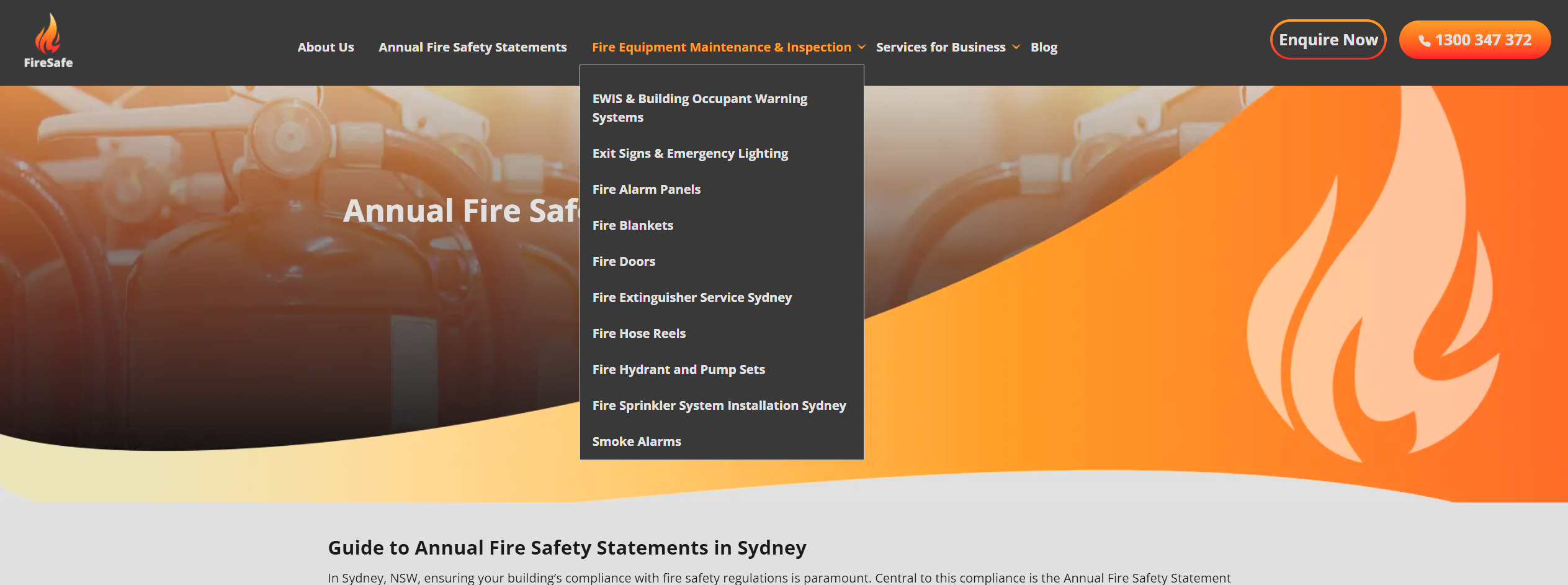
FireSafe’s key service page was rendering with completely broken CSS — a navigation menu blown out across the entire viewport. The client had ruled out their browser and checked WordPress. AHS traced the request path, isolated a stale server-side cache object, and restored the page with a single targeted purge. Zero code changes.

ClientFireSafe
IndustryFire Safety Services, Sydney NSW
ServiceWordPress Hosting Support
OutcomePage restored with one targeted cache purge
TL;DR
ProblemSingle page rendering with broken CSS — navigation fully expanded, layout collapsed — reproducible across all browsers and sessions
Root causeStale server-side full-page cache object. The page had been cached during a transient broken state and the cache never invalidated, so the broken copy was served to every visitor on every request
The fixTargeted purge of the site’s page cache, forcing regeneration from WordPress
TimeMinutes from investigation to fix
1Cache purge to full resolution
0Code or configuration changes
100%Page rendering restored
MinutesFrom investigation to fix
The situation

Broken in every browser. Fine in WordPress.

FireSafe contacted AHS reporting that their Annual Fire Safety Statements page — one of the highest-value service pages on the site — was rendering broken. The navigation menu was fully expanded and stacked over the page content, with the layout completely collapsed.

FireSafe had done solid first-line troubleshooting before calling. Tested in a standard browser session — broken. Tested in an incognito window — still broken, which ruled out local browser cache, cookies and extensions. Checked the WordPress admin — theme intact, page content intact, no recent changes, nothing in error.

That combination is exactly where site owners hit a wall. If it’s not the browser and it’s not WordPress, what’s left? The answer: the layer sitting between them.

ClientFireSafe
IndustryFire safety compliance and equipment services, Sydney NSW
IssueSingle page rendering with broken CSS — navigation fully expanded, layout collapsed — reproducible across all browsers and sessions
Root causeStale server-side full-page cache object. The page had been cached during a transient broken state and the cache never invalidated, so the broken copy was served to every visitor on every request
ResolutionTargeted purge of the site’s page cache, forcing regeneration from WordPress
Time to resolutionMinutes from investigation to fix
OutcomePage fully restored; client briefed on the site’s caching architecture
How AHS resolved it

Trace the request path. Isolate the layer. Purge the object.

No guessing, no toggling plugins on a live site. The fault signature pointed at one layer, and the client’s own testing had already eliminated the other two.

1

Client reports the fault

FireSafe reported the broken page, including their own testing: reproducible in standard and incognito sessions, WordPress admin healthy. That prior work wasn’t repeated — it was used. It had already eliminated two layers of the stack.

2

Symptom assessed: this is a caching signature

Broken for every visitor, in every browser, on one specific page, while the application itself reported healthy — that’s not a theme fault or a plugin conflict. A code-level fault would break consistently across the site or vary with session state. A single page frozen in a broken state points at full-page caching.

3

The delivery layer inspected

A WordPress site doesn’t serve WordPress on every request. PHP builds the page once, and the server-side page cache stores that generated HTML and serves the stored copy to subsequent visitors — bypassing PHP entirely. It’s what keeps a WordPress site fast under load. AHS went straight to that cache layer and confirmed the affected page was being served as a cached object, not generated live.

4

Root cause confirmed: a stale object cached mid-fault

The cached copy had been generated at a moment when the site was in a transient broken state — the page HTML captured while its styling was failing to load. Because the cache never invalidated that object, the broken snapshot became the permanent “live” version. Every browser on every device received the identical broken payload — which is exactly why incognito testing changed nothing. The fault wasn’t downstream of the server. It was the server’s response.

5

Targeted purge. Instant regeneration.

The page cache was purged. On the next request the cache missed, WordPress regenerated the page fresh, the new copy — rendering correctly — was cached, and every subsequent visitor received the healthy version. Total intervention: one purge. No theme edits, no plugin changes, no configuration touched, no downtime.

6

The client briefed on their own stack

AHS walked FireSafe through the two distinct cache layers in play: browser cache (client-side, per-device — the one incognito bypasses) and website cache (server-side — the one incognito can’t touch). They now know why their testing produced the results it did, and that “clear the site cache” is the first move if a page ever freezes in a bad state again.

Before and after

The same page. One purge apart.

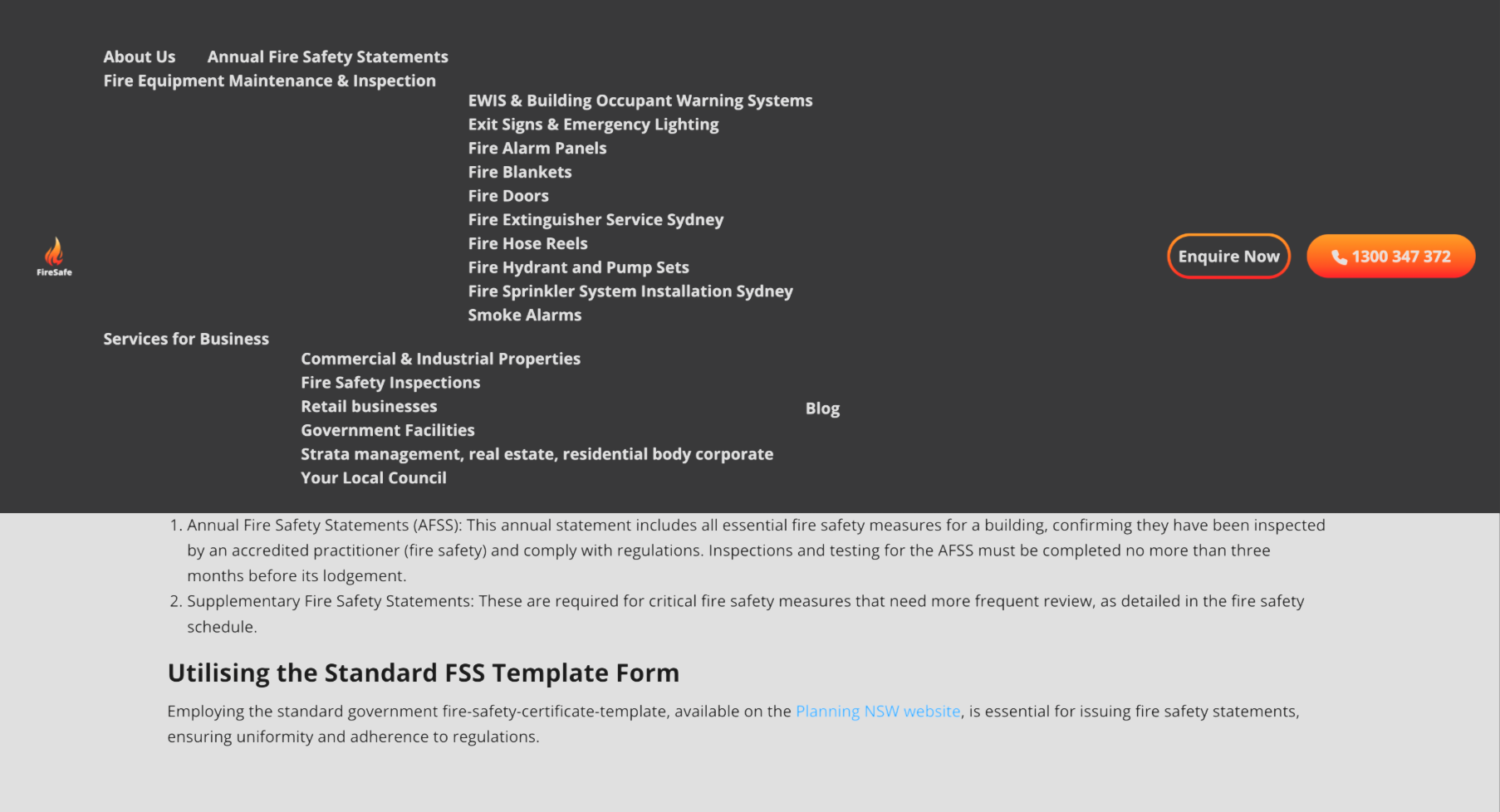
The broken snapshot every visitor was being served — and the page as it regenerated on the first request after the purge.

FireSafe page before the purge, with the navigation menu fully expanded over the collapsed layout
Before — navigation blown out, layout collapsed
FireSafe page after the purge, rendering correctly with working navigation
After — regenerated correctly on the first request
The difference

Guess and rebuild. Or trace and isolate.

Any change can accidentally trigger a cache purge — which is how generic support sometimes “fixes” this fault without ever finding it, leaving it free to recur.

Standard web support

Start disabling things and hope.

  • Assumes theme or plugin failure and starts disabling things on a live site
  • Trial-and-error changes with no working hypothesis
  • Hours billed troubleshooting layers that were never at fault
  • May “fix” it accidentally without ever knowing the real cause — leaving it free to recur
  • Client left no wiser
Australian Hosting Solutions

Read the signature. Purge one object.

  • Reads the fault signature before touching anything
  • Uses the client’s own testing to eliminate layers instead of repeating it
  • Isolates the exact layer — client, application, or delivery — at fault
  • One targeted action, zero changes to the client’s site
  • Root cause identified and explained, so it’s understood, not just gone
The result

One purge. Fully restored. Fully explained.

A key compliance page back for every visitor — with the root cause identified rather than masked.

Page instantly restored

The page regenerated correctly on the first request after the purge. No rebuild, no rollback, no downtime, no maintenance window.

🔍

Actual root cause, not a lucky fix

The fault was isolated to a specific stale cache object — not guessed away by toggling plugins. When you know the exact cause, you know it’s actually resolved.

🧠

Client understands their own stack

FireSafe now knows the difference between client-side and server-side caching, why incognito testing couldn’t reveal this fault, and what to check first next time.

🛡

Zero unnecessary changes

Nothing was modified on the site itself. No speculative edits to a production WordPress install, no repair invoice for work that wasn’t needed.

What was delivered

The deliverables, documented.

Deliverable Detail
Issue triage Response Client’s report and prior testing incorporated directly into the diagnostic path, eliminating the client-side and application layers immediately.
Fault-signature analysis Technical Symptom pattern — one page, all visitors, all sessions, healthy application — identified as a full-page caching fault before any changes were made.
Delivery-layer diagnosis Technical Confirmed the affected page was being served as a stale server-side cache object generated during a transient broken state.
Targeted cache purge Fix Single purge of the page cache, forcing clean regeneration from WordPress. No code, theme, plugin, or configuration changes.
Architecture briefing Communication Plain-English walkthrough of browser cache vs server-side page cache, and why the fault presented the way it did.
Restored service page Outcome Key compliance service page rendering correctly for all visitors, with the root cause identified rather than masked.
Australian Hosting Solutions customer support icon People behind the platform

We don’t guess. We trace.

A broken-looking page doesn’t mean a broken website. AHS knows every layer between your WordPress install and your visitor’s screen — the browser, the cache, the server, the application — and reads the fault signature before touching anything.

What clients say

Real reviews. Real clients. A consistent pattern.

Verified Google reviews published by Australian Hosting Solutions customers.

★★★★★
“Damien has always been polite, professional and always delivers on what he promises. Every time I have a query, Damien always returns my calls and resolves any issue quickly and efficiently.”
Dianne Xiberras · Verified Google Review
★★★★★
“Damien is fantastic! He has helped our business (Thrifty Seal) over 3+ years; answering all of our calls, answering all of our many questions — he is very efficient and prompt.”
Sam Goddard · Verified Google Review
★★★★★
“Above and beyond service… Secure Web Services’ service was so good I decided to change everything to them instead. 11/10!”
Luke Perrier · Verified Google Review
★★★★★
“This team led by the talented Damien Owen exceed expectations! Reliable, honest, awesome are a few words that come to mind.”
Lyn Mack · Verified Google Review
Your website deserves support that understands hosting

Stop troubleshooting in the dark.

When your site breaks and nothing in WordPress explains why, AHS isolates the real cause — fast. Talk to the team today.